Archive for May, 2010

Use your native monitor resolution.. Or else?

For Heaven’s sake.. People! Please, get out of that.. VGA 640×480 mode.. or 1024×768 on some LCD that is 17 inches and beyond. Try using the resolution that your monitor was meant for. Show-off that uber screen size! Unless maybe you really have issues reading due to low vision or the like.

Or.. Else… Maybe someday you’d face the wrath from someone like me :P

27860_391184582373_645857373_4257719_4634132_nAbove featured characters are:
RRaghav Passi,
NSilhouetted Nish (Me),
SSwarnava Seal

The comic was created in reference to an argument here.

New Facebook Twitter app changes FAIL

The official Twitter app on Facebook that updates your statuses on Facebook from your Twitter account recently underwent changes. The first one was a neat addition of ‘via Twitter’ below the status message on newsfeeds, with a blue Twitter ‘t’ icon. Second time, they took it off and turned into a normal status again.

fbtw6 

For the third time change, which is the current one, they turned it back into the blue Twitter icon, plus added your profile link, which is a nice addition…

fbtw5

…BUT, at the cost of a very stupid decision to turn these statuses into application ‘posts’. They are no longer imported as normal Facebook statuses, so they will be treated as an application post on newsfeeds.

Tweets from multiple friends using Twitter app will be group and hidden.

fbtw1

WILL NOW BE SHOWN AS..

fbtw2

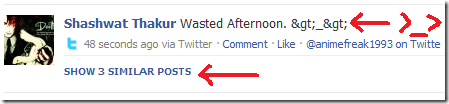
^—As you can see, my tweet is instantly hidden, even though it is my first tweet, and not a series of updates that would deserve hiding due to flood. And yes, there is also a borkage of commonly used emoticon symbols ‘>_>’ as >_>

Since these are not statuses, your Facebook primary status that is shown at the top of your profile page, right next to your name shall not be updated as well.
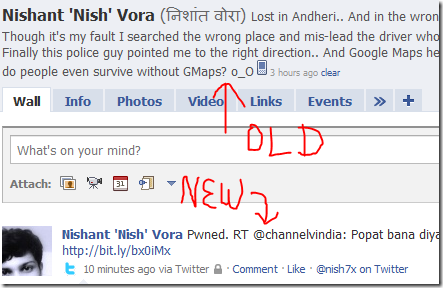
fbtw3

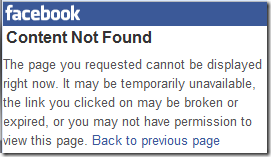
And, the WORST part of this change is that these posts are not visible on Facebook Mobile, because FBMobile hides application updates. They are only visible on Facebook Touch. Hence your mobile friends will miss out on your regular updates.
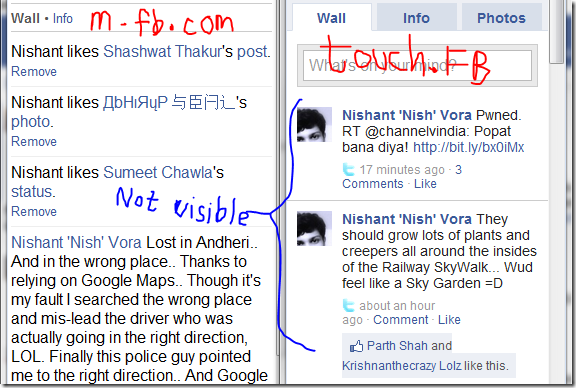
fbtw4

If you try to open a Twittered Facebook post notification on mobile, it’ll simply show this screen:
fbtw7

So I hope Facebook tries to correct this mistake annoyance very soon. Or I shall have to stop tweeting again =\

EDIT: An alternative to this is an app called Smart Twitter that treats your tweets as statuses.

Mother’s Day 2010

‘Tis how I celebrated my Mom’s day =) Kinda lazy to write anything, so photos should do.

Sunday, May 9th, 2010.

31389_388142897373_645857373_4189818_6936313_n


29695_388324712373_645857373_4194242_1584571_n

Just Another Guy

This is a lovely poem written by a dear friend that kind of describes the present me true to some extent.


~~~Just Another Guy~~~

So this is a little poem,

About this guy I know,

Really strange he is,

When he hides really low.


Sometimes he gets all emo,

And blocks everyone he knows.

He doesn’t have any foes,

As he keeps all his friends close.


Okay, Maybe not all,

And certainly not that close,

He just tweets about his life,

From the bathroom and from his course.


But he is very lazy,

As he does nothing but tweet.

He talks to various people,

But with them, he’ll never meet.


Everyone loves him,

As he can be very sweet.

But he’s kinda annoying,

When he tries to be discreet.


He is always evasive,

And never says yes or no,

He’ll say “maybe”,

To a question you’re dying to know.


He’s amazing at making excuses,

And tries to get away,

And when you are concerned about him,

He’ll say nothing but “k”.


Anyway, I’ll take my leave,

As he won’t read this I know.

He’ll have all the free time,

But still won’t read my notes.


So I’ll say bye to him,

Won’t even leave a little post,

‘Ola’ I won’t say,

Because that’s what’ll make him miss me the most.

Using Mayflash Wi-Fi Link dongle in Vista / Windows 7

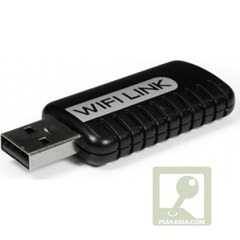
As all owners of this Wi-Fi dongle must have gone through this issue, probably the most of them have not found a solution or workaround yet, and stick to using Windows XP or a virtual XP machine on Vista/7 to use the dongle for connection to DS.  By default, the dongle installs as an Atheros adapter in Vista/7, which can be used as an ‘Ad-hoc’ connection for setting up Wi-Fi, but it only works for laptops and other network devices. Nintendo DS does not seem to be assigned an IP automatically.

PA.67449.002[ Click to buy one for your DS/PSP/Laptop ]

After a year of annoyance trying to use Virtual XP for DS, I’ve finally found a working solution. Let me share the same with you in simple steps.

  1. Get zydas_vista_compat.zip (Mirror link)
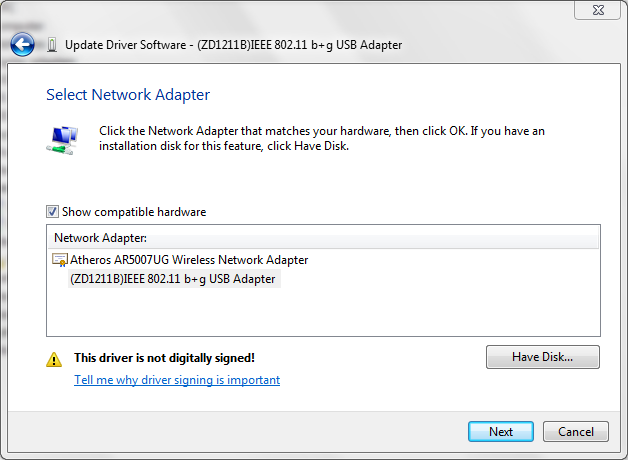
  2. Install the ZDWlan driver. Vista/7 might have already installed your Wifi dongle with the Atheros device. Force it to install the ZDWlan driver from Device Manager as ‘Update driver’ ‘Let me choose on my own’ ‘Have Disk’ and navigating to C:\Program Files\ZyDAS Technology Corporation\ZyDAS_802.11g_Utility\InsDrvTemp_USB and choose ZD1211BU.INF.

    zdwlan8

  3. Now run the ZDWlan utility. As you’ll notice it will simply appear for a second on the taskbar and vanish, while it is still running in the background (taskmgr). End the process. Right-click ZDWlan application and give it Windows 2000 compatibility with Administrator privileges (or Windows 2003 if that doesn’t work). Now the main application interface will open once you click on the ZD icon in tray.
  4. Choose Mode: Access Point. And in the Bridge Adaptor settings, choose your Internet adaptor.

    zdwlan2

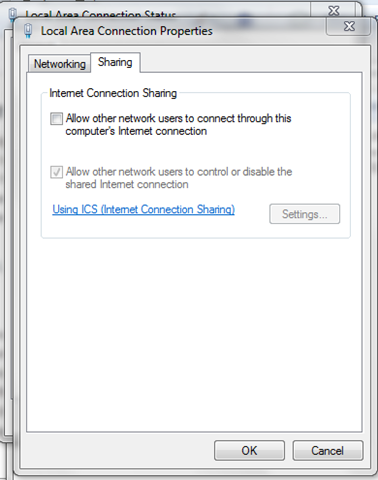
  5. Ensure that ICS is turned off on your Internet adaptor settings.

    zdwlan3

  6. Get NAT32 and winpkflt_rtl.zip
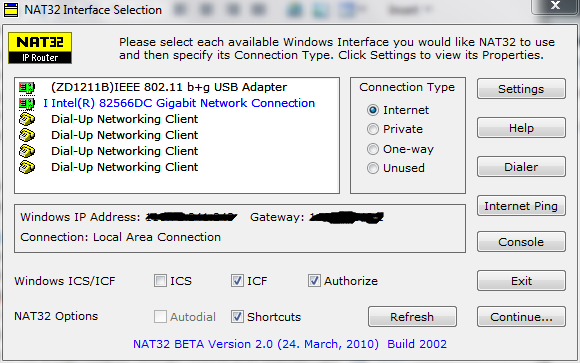
  7. Install both. Now open NAT32. Select Internet adaptor as ‘Internet’ and Wifi dongle adaptor as ‘Private’

    zdwlan4 

    zdwlan5

  8. Hit Apply twice until you get this window.

    net32

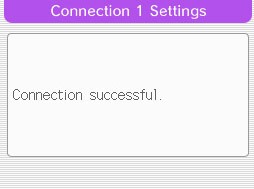
  9. Now select the Access point from your Nintendo DS WFC menu, do not set any IPs, test connection.. and voila! =D

    connectionSuccessful

  • Get Adobe Flash playerPlugin by wpburn.com wordpress themes